-->

dev dotnet

In the previous post, we discussed using the var keyword. One of the primary use cases of the var keyword is anonymous types. In this post, we are going to look closer into anonymous types.

Anonymous types

An anonymous type is a nameless class that inherits from an object.

The type is inferred, by the compiler, at initialization.

For example, a typical anonymous declaration would look like this:

var person = new 
{
  FirstName = "John",
  LastName = "Power",
  Age = 33
};

We can see, just like any other object, it supports IntelliSense. We can see all the properties we defined and the methods coming from the Object class, such as ToString() and Equals(). So it is a strongly-typed class. We don’t know the type.
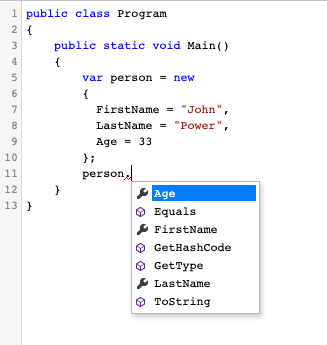
Auto-complete showing the properties of person object

The properties are read-only. If we try to assign another value, we get the following error:

Compilation error (line 11, col 3): Property or indexer 'AnonymousType#1.Age' cannot be assigned to -- it is read only
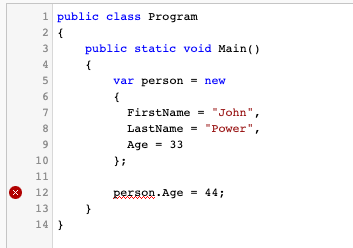
IDE showing error when assigning value to property

Since we don’t have a handle on the class, how can we create another object of this type? The answer is simple: We make another anonymous type with the same properties.

For example, the following example would compile successfully:

public class Program
{
    public static void Main()
    {
        var firstPerson = new 
        {
          FirstName = "John",
          LastName = "Power",
          Age = 33
        };

        var secondPerson = new 
        {
          FirstName = "Jane",
          LastName = "Power",
          Age = 44
        };

        firstPerson = secondPerson;
    }
}

secondPerson can be assigned to firstPerson as they have the same type. An assignment is only possible if all the properties match. If we remove the Age property from the secondPerson, we get the error shown below:

Compilation error (line 18, col 17): Cannot implicitly convert type 'AnonymousType#1' to 'AnonymousType#2'

Shorthand Declarations

We don’t need to specify the property names if we assign the object from another. So, for example, if we wanted to create a second object of the same type with the same values, we could use this syntax:
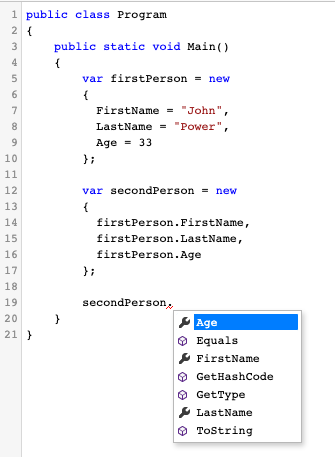
Auto-complete showing the properties on secondPerson object

As shown in the screenshot above, we can still see the same property names as the firstPerson object.

The same feature exists in ES6.

Internals of Anonymous Types

So what happens when we compile our application with anonymous types? The type names are generated automatically by the compiler.

The example below shows what our class looks like with an IL viewer:
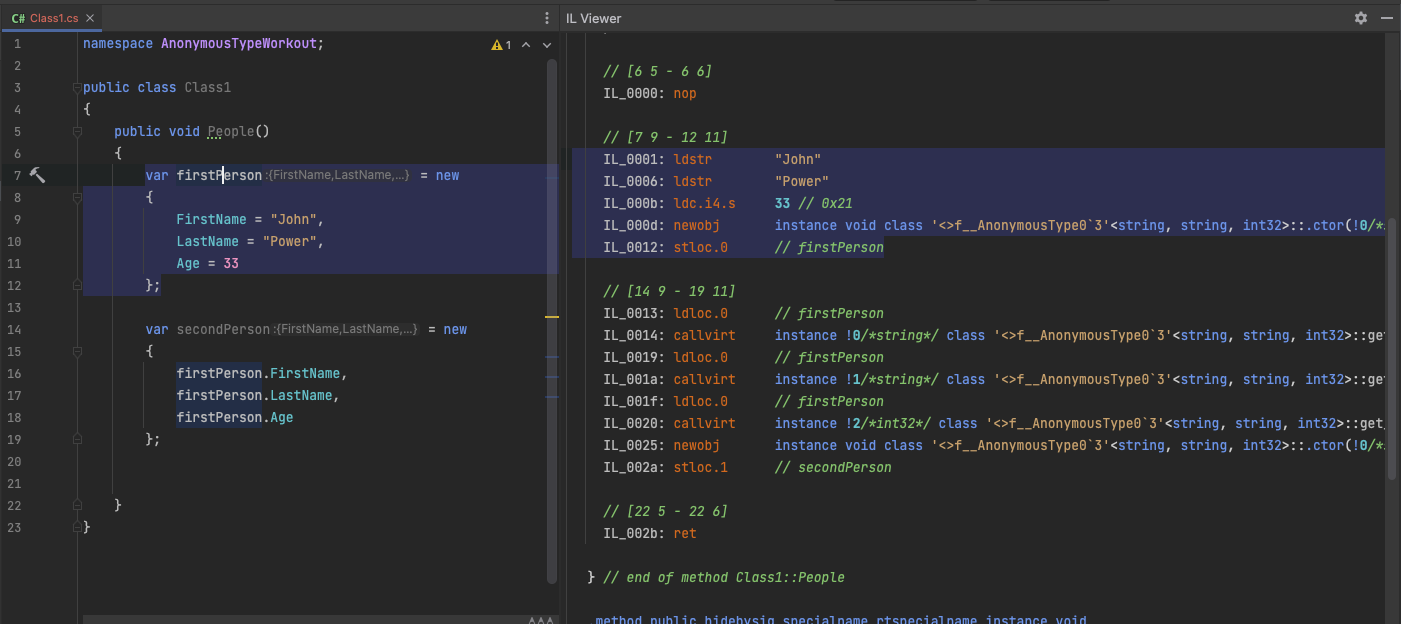
The output of IL viewer showing the compiler output of anonymous types

We declared the firstPerson and secondPerson objects defined (of the same type) as:

instance void class '<>f__AnonymousType0`3'<string, string, int32>::.ctor(!0/*string*/, !1/*string*/, !2/*int32*/)

These auto-generated type names are hidden from the developer because we don’t need to know what they are. So it’s generally a bad practice to find out these types via reflection.

The final example shows the IL output when I’ve removed the Age property from the secondPerson object. Now that the properties don’t match with firstPerson, the compiler generates a new type for secondPerson named <> f__AnonymousType1’2:
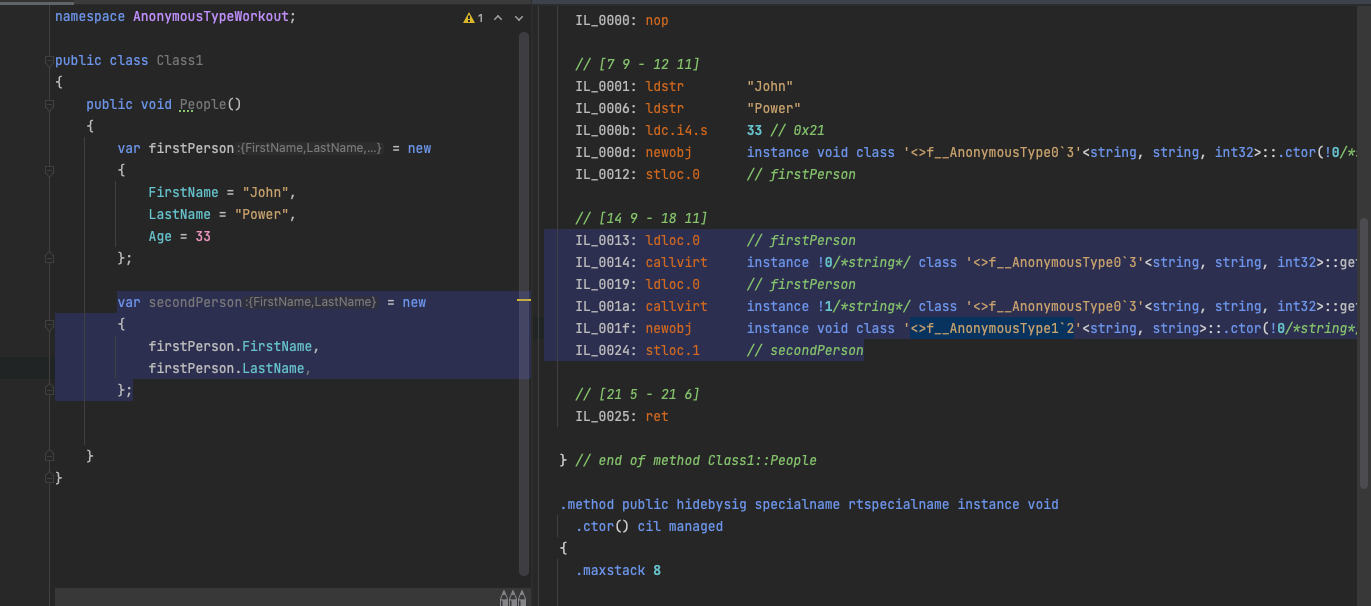
The output of IL viewer showing the compiler output of anonymous types when Age property is removed from secondPerson object

Resources

dev dotnet, csharp

The var keyword in C# gives the programmer freedom to declare variables with implicit types. However, when to use it is a highly debated subject in the C# community. This post will look at the origins of the var keyword and our conclusion on when to use it.

Origins

Microsoft introduced the var keyword in C# 3.0, which allows declaring “implicit” variable declarations. However, the variables declared with the var keyword are still strongly typed. The difference is that you don’t need to declare it yourself; the compiler determines the type.

For example, the following code would not compile:

var i = 10;
i = "x";

When i is declared, the type is determined to be an integer, so the string assignment fails with the following error:

Compilation error (line 7, col 7): Cannot implicitly convert type 'string' to 'int'

For the same reason, as you can imagine, you cannot just declare a variable with var type such as:

var i;

which would fail with the following error:

Implicitly-typed local variables must be initialized

Usage

Var keyword mainly has two usages:

  1. Declare anonymous types
  2. Not repeat type name in a variable declaration and object instantiation

The first usage is non-debatable, meaning that var is your only option if you declare anonymous types. Below is an example of using the var keyword to declare an anonymous type:

var person = new {Id = 1, Name = "Jack", Age = 25 }

Another use case is a query expression where you select a new type.

var somePeople = from person in people
                 where person.Age > 20
                 select new { person.Id, person.Name }

In the second example, we create a new type on the fly rather than returning an existing one, so we must use the var keyword.

The debate

The debate around when to use var revolves around the second usage, as the first one is mandatory if you need anonymous types. So, should we use it as a shortcut and skip type declarations? Does that make the code easier or harder to read?

For example, consider a complex variable declaration as shown below:

Dictionary<string, Dictionary<string, List<string>>> items = new Dictionary<string, Dictionary<string, List<string>>>();

We can declare the same variable with the var keyword:

var items = new Dictionary<string, Dictionary<string, List<string>>>();

In my opinion, the second option is a lot clearer and makes the code easier to read.

Try to avoid duplication whenever possible.

Now let’s take a look at another example:

var userService = new UserService();
var user = userService.GetUser(1);

What is the type of “user”? Without the help of the IDE we are using, there is no way to know for sure just by looking at the code above. It can be a User class, an IUser interface, or a subclass of User. At this point, we don’t know.

Conclusion

Here’s my rule of thumb on when to use var:

If the type of the variable is apparent in the initialization of the variable, it’s ok to use the var keyword.

For example, to review the above example, I’d go with explicit usage:

var userService = new UserService();
User user = userService.GetUser(1);

But if I were declaring the variable with a new keyword, I’d go with var:

var user = new User();

The benefit of this approach is especially obvious with complex types like the dictionary shown above:

var items = new Dictionary<string, Dictionary<string, List<string>>>();

In this case, duplicating the type name doesn’t add more clarity.

I hope this article helps you decide when to use the var keyword in C#.

Resources

aws s3

Hashing is the operation of creating a unique, fixed-length string from any piece of data. The output is called a “hash” or “message digest”. It is a one-way operation meaning that you can obtain the original message by reverse-engineering the digest even if you knew the hashing algorithm used to create it. I love using hashes as they can provide great value in maintaining the security and integrity of our data.

Calculating file hashes using PowerShell

The cmdlet to use in PowerShell is Get-FileHash.

Usage is very straightforward. You provide it with the path and the hashing algorithm you want to use:

Get-FileHash
   [-Path] <String[]>
   [[-Algorithm] <String>]
   [<CommonParameters>]

As you can see above, the Path parameter is a string array, so you can use it to calculate multiple hashes.

How to use file hashes with AWS S3

To verify the file’s integrity during upload, we can use the Content-MD5 HTTP header. This header is not specific to AWS, but it fits perfectly when uploading files, especially if they are big media files.

You must convert the Content-MD5 value to Base64 before sending it in the request.

Preparing the lab environment

Downloading a sample file

The file I worked with is a sample that’s publicly available here:

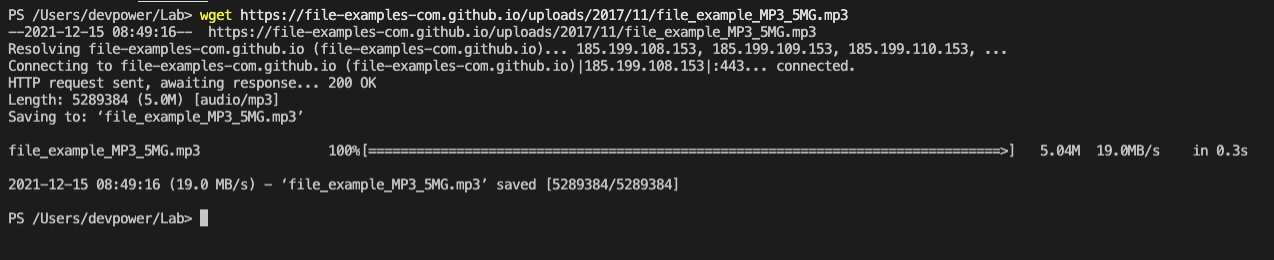
So I first fetched the file to my local lab:

wget https://file-examples.com/storage/fee788409562ada83b58ed5/2017/11/file_example_MP3_5MG.mp3

The URL of the sample files keep changing, so don’t try the script above directly. Instead, get the link first, then run the command with your link.

Output of wget command showing the download of a file

Generate MD5 hash

To get the MD5 hash, I ran the following command:

Get-FileHash -Path ./file_example_MP3_5MG.mp3 -Algorithm MD5

and the output is:

Terminal window showing the successful output of Get-FileHash cmdlet

Create target bucket

Creating a new S3 bucket is simple as follows:

New-S3Bucket -BucketName "filehash-workout" 

Send the file with hash

Fortunately for us, AWS provides an easy way to use MD5 hashes when uploading the file with Write-S3Object. It automatically calculates the hash value for us:

Write-S3Object -BucketName "filehash-workout" -File ./file_example_MP3_5MG.mp3

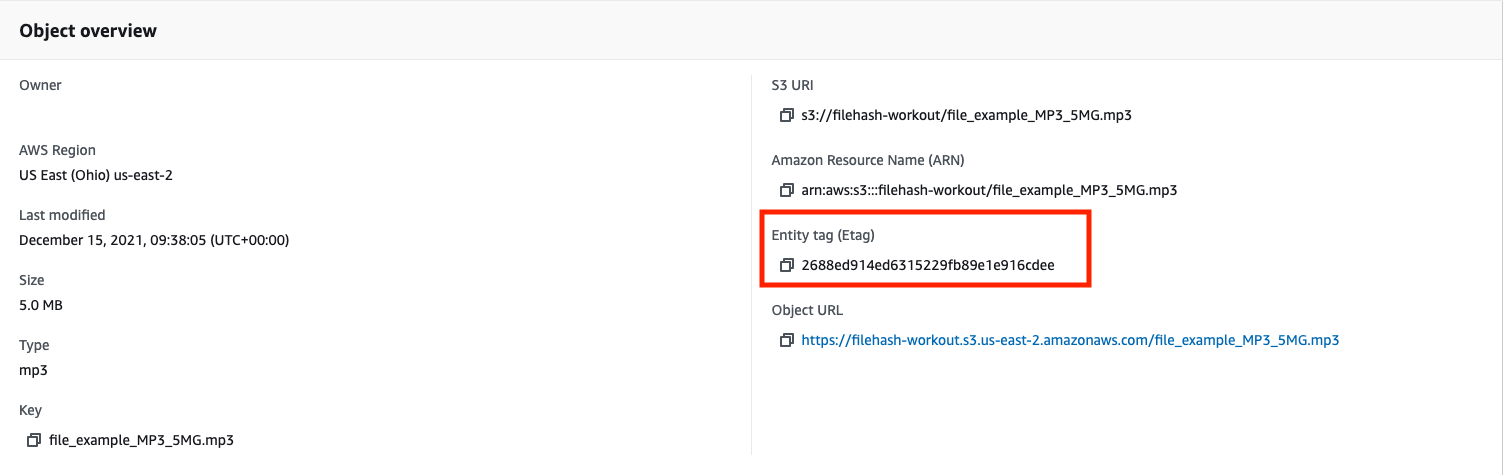
The MD5 value is stored as an Etag value. You can see it on AWS Management Console:

AWS S3 dashboard showing the Etag value of the uploaded file

Check the file hash

As the final step, we need to pass the MD5 hash of the file on our end and see if it matches the value on AWS:

Please note from the above, the hash value is stored in all lowercase on AWS.

If we send the file hash as we get from Get-FileHash, we get the following error:

Terminal window showing PreconditonFailed error after running Get-S3ObjectMetada cmdlet

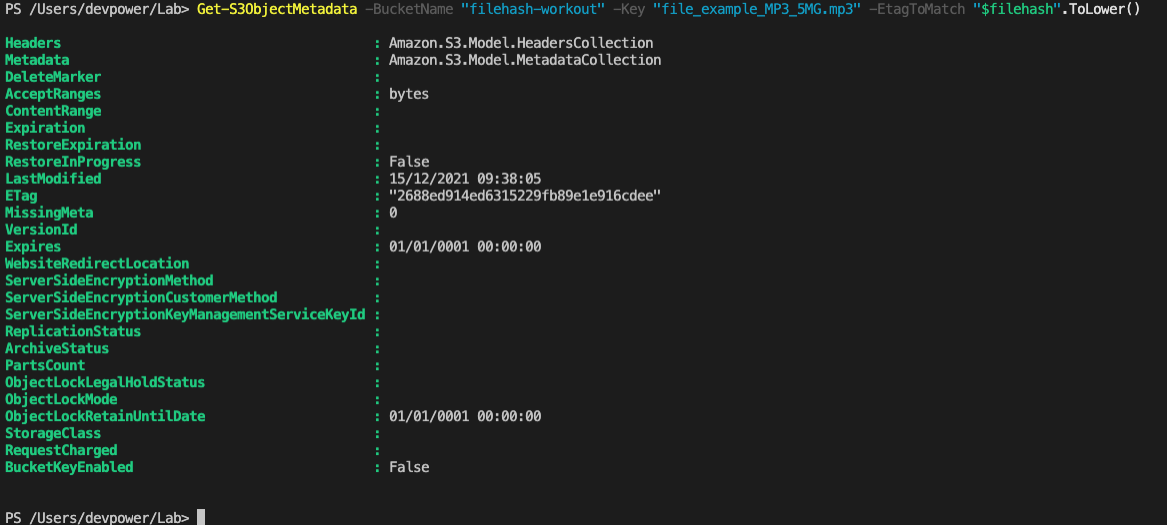
When we convert the hash value to lowercase, we can get a successful result:

$filehash = (Get-FileHash -Path ./file_example_MP3_5MG.mp3 -Algorithm MD5).Hash
Get-S3ObjectMetadata -BucketName "filehash-workout" -Key "file_example_MP3_5MG.mp3" -EtagToMatch "$filehash".ToLower()

Terminal output showing successful output of Get-S3ObjectMetada cmdlet executed with correct hash value

This technique works for files up to 16MB. For larger files, Write-S3Object uses multipart upload, and the ETag value becomes the MD5 hash of the part.

Clean Up

It’s always a good practice to clean up after a lab session:

Remove-S3Bucket "filehash-workout" -DeleteBucketContent -Force
Remove-Item ./file_example_MP3_5MG.mp3

Resources